How to Search PubMed with AI: A Step-by-Step Guide
Linda
A step-by-step tutorial on using AI to search PubMed. Learn how to go from a research question to a structured evidence summary with citations using Noah AI's PubMed Search.
Searching PubMed traditionally means learning Boolean operators, identifying the right MeSH terms, and iterating on your query until the results look relevant. AI-powered search tools offer a different approach: you describe your research question in plain English, and the AI handles query construction, search execution, and results synthesis.
This tutorial walks you through a complete AI-powered PubMed search using Noah AI, from formulating your question to reviewing the structured evidence output. No Boolean knowledge or MeSH familiarity is required, though understanding what happens behind the scenes will help you evaluate the results critically.
Before You Start
You will need an account at Noah AI. Noah AI’s product materials state that a structured summary can take approximately 10–20 minutes to generate. Processing time may vary by query complexity and the volume of relevant literature.
Step-by-Step: AI-Powered PubMed Search
Step 1 — Formulate Your Research Question
Start with a clear, specific research question. The more precise your question, the more focused the results. AI tools work best when your question includes the key elements a researcher would naturally consider: the population or condition, the intervention or exposure, and the outcome of interest.
You do not need to structure your question in formal PICO format, but thinking about these elements helps you write a better question.
Example question for this tutorial:
Research QuestionWhat are the cardiovascular benefits and risks of GLP-1 receptor agonists (semaglutide, liraglutide) in patients with type 2 diabetes and established cardiovascular disease, based on randomized controlled trial evidence?
Step 2 — Navigate to PubMed Search in Noah AI
Go to Noah AI and log in. Navigate to Agent → Search → PubMed Search. This opens the PubMed-focused search workflow where you can enter a natural-language research question.
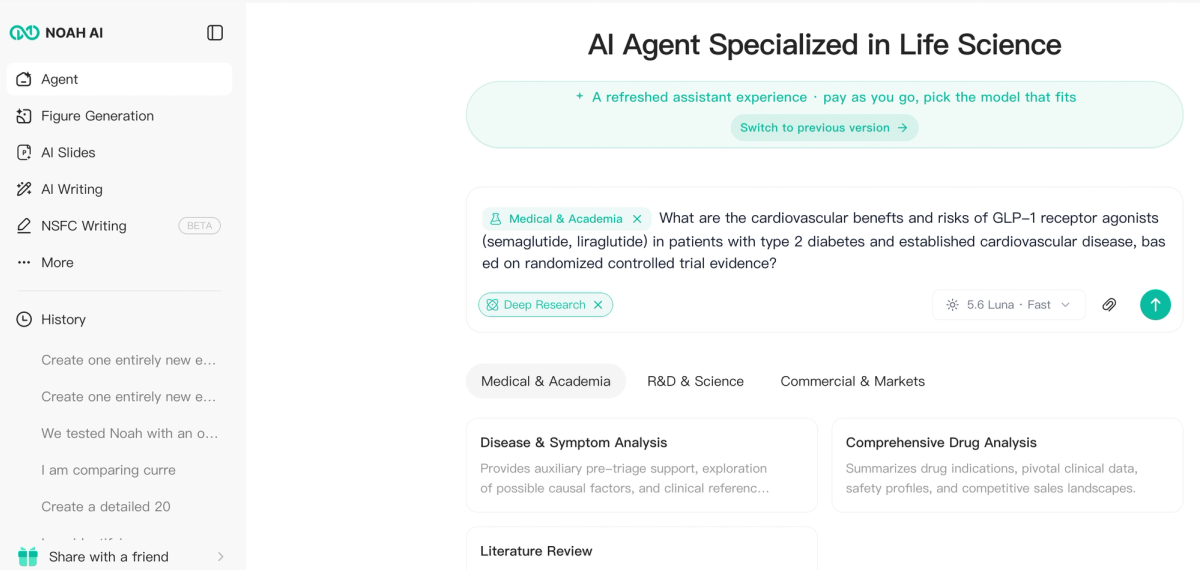
Figure 1. Noah AI navigation showing the path Agent → Search → PubMed Search with the GLP-1 cardiovascular research question ready to submit.
Step 3 — Enter Your Query and Wait for Processing
Paste or type your research question into the search field and submit it. Noah AI then searches relevant PubMed literature and organizes the retrieved evidence around the question.
For this tutorial, the query focuses on randomized cardiovascular-outcomes evidence for liraglutide and semaglutide in people with type 2 diabetes and established cardiovascular disease.
Step 4 — Review the Structured Evidence Brief
Once processing is complete, review the structured evidence output. Focus on whether the answer addresses your requested outcomes, whether important trial results are represented clearly, and whether the claims can be traced back to source papers.
In this example, Noah organizes cardiovascular outcomes for liraglutide and semaglutide into a comparison table covering MACE, cardiovascular death, stroke, myocardial infarction, heart-failure hospitalization, and kidney outcomes.
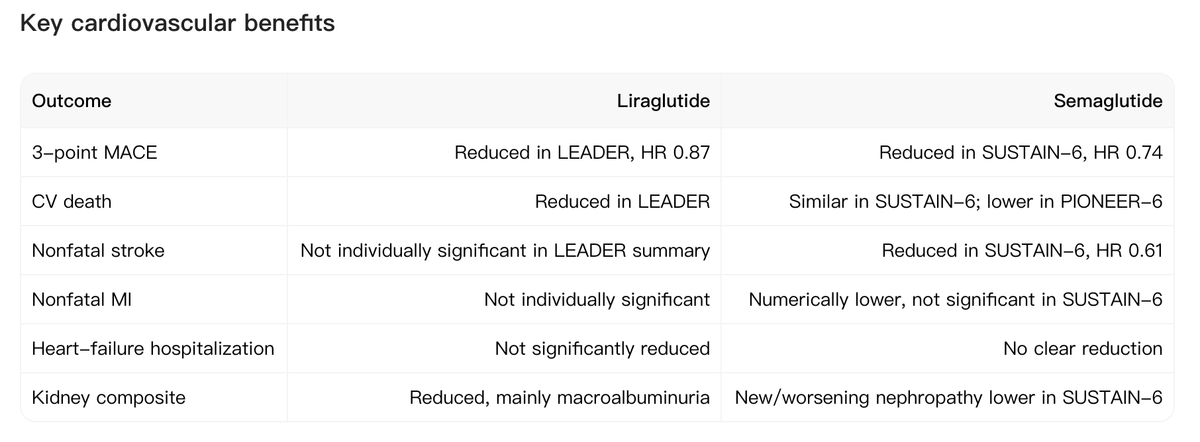
Figure 2. Noah AI structured evidence output comparing key cardiovascular outcomes for liraglutide and semaglutide.
Step 5 — Verify Key Findings Against Original Papers
AI-generated summaries can help you navigate the literature faster, but important findings should still be checked against the original sources. In Noah AI, the References Overview shows the papers supporting the answer, including paper title, PMID, authors, publication date, and other source metadata.
Use these source details to open the original PubMed record and confirm effect sizes, confidence intervals, study design, and limitations before citing the paper in research or making a high-stakes decision.
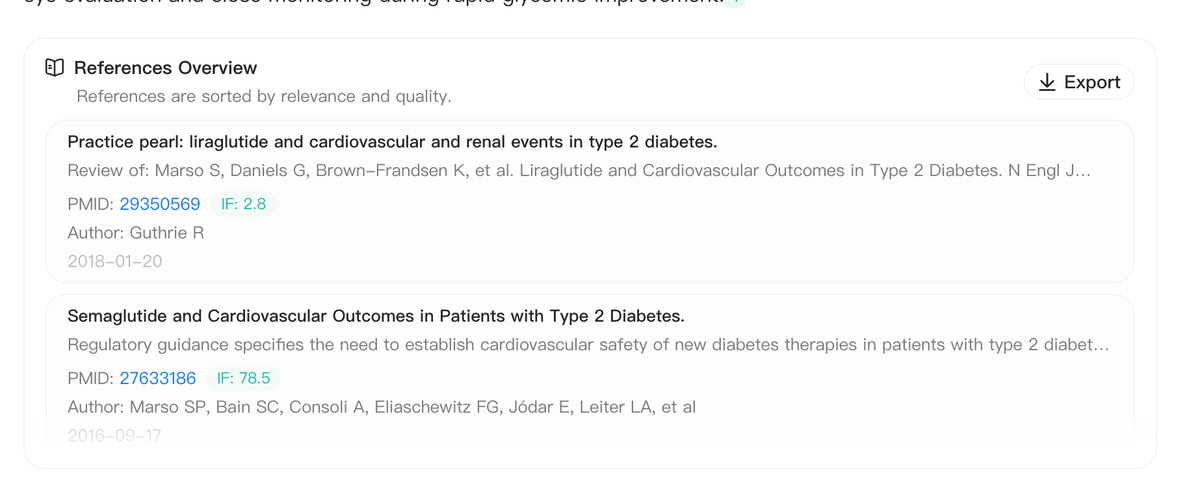
Figure 3. Noah AI References Overview showing source papers and PMIDs used in the GLP-1 cardiovascular evidence summary.
Tips for Better AI-Powered PubMed Searches
Tip 1: Be Specific About Outcomes
Instead of “What are the effects of GLP-1 agonists?”, specify the outcomes you care about: cardiovascular mortality, MACE, HbA1c, weight loss, or adverse events. Specific questions produce more focused evidence briefs.
Tip 2: Include Study Type When Relevant
If you specifically want randomized controlled trial evidence, say so directly in the query. This narrows the research task and makes the output easier to evaluate.
Tip 3: Use Follow-Up Queries to Dig Deeper
If the initial evidence brief raises a specific uncertainty, run a follow-up query focused on that issue. For example: “What do individual RCTs show for cardiovascular mortality with semaglutide specifically?”
Tip 4: Compare with a Traditional PubMed Search
For important research questions, consider running both an AI-assisted search and a traditional PubMed Advanced Search. The AI workflow can accelerate discovery and synthesis, while the traditional search gives you direct control over a reproducible search strategy. For guidance, see How to Search PubMed More Effectively.
What Happens Behind the Scenes
Noah AI’s PubMed workflow is designed to translate a research question into a biomedical literature search and then organize retrieved findings into a structured answer. Product materials describe support for PICO-aware query building, MeSH and synonym expansion, and structured evidence synthesis.
PICO-aware query building helps map the population, intervention, comparison, and outcomes contained in a natural-language question. For guidance, see How to Search PubMed More Effectively.
MeSH and synonym expansion helps account for different terminology used across biomedical papers, reducing the need to manually enumerate every wording variation.
Evidence synthesis organizes retrieved findings into a structured answer rather than leaving the researcher with only a list of paper titles.
Try Noah AI for Free
Use Noah AI to search, compare, and analyze biomedical evidence with AI-powered research workflows.
Free credits are available, and no credit card is required to get started.
FAQ
How long does an AI-powered PubMed search take?
Noah AI’s product materials state that structured summaries can take approximately 10–20 minutes to generate. Actual time may vary with the research question and literature volume.
Is the AI summary reliable enough to use directly in a paper?
You should cite the original research papers, not the AI summary. Use the structured evidence output to find and navigate relevant literature, then verify and cite the primary sources you review.
Can I use this for a systematic review?
AI-assisted search can support scoping, discovery, and early synthesis. Formal systematic reviews still require a documented and reproducible database-search methodology appropriate to the review protocol.