
Free Mind the Graph Alternative for Scientific Poster Figures (2026)
Linda
Compare free Mind the Graph alternatives for scientific poster figures, with a real Noah AI PubMed-grounded DNA-repair case, screenshots, prompts, and QA guidance.
If you are looking for a free Mind the Graph alternative for scientific poster figures, first separate two jobs that are often treated as one. One job is assembling the complete poster: title, authors, methods, charts, references, and print dimensions. The other is producing the central scientific figure that makes somebody stop, understand the research question, and ask a useful question.
Noah AI is the strongest option in this comparison when the difficult part is turning a biomedical brief and PubMed evidence into that central scientific figure. Canva and Adobe Express are better for arranging an entire poster with templates. Inkscape is better for precise, free vector finishing. Mind the Graph remains strong when you want a large scientific asset library and manual poster templates.
Quick answer: use Noah to create and revise the evidence-informed scientific hero figure, then place the approved export into Canva, Adobe Express, Inkscape, PowerPoint, or your institution's poster template for final assembly.
Create a literature-informed scientific poster figure with Noah AI.
Quick comparison
| Tool | Best use in a poster workflow | Free access | Scientific evidence workflow | Main limitation |
|---|---|---|---|---|
| Noah AI | PubMed-informed central scientific figures | 20 free generations advertised | PubMed retrieval, figure generation, explanation, references, and natural-language revision in one task | Not a full poster-layout editor; exact strings still require final QA |
| Mind the Graph | Manual poster construction with scientific assets | Free plan available | Scientific templates and curated illustrations; evidence review remains researcher-led | Free exports may retain a watermark and attribution requirements |
| Canva | Complete poster layout and collaboration | Free templates and elements available | Sources and biological accuracy are handled outside the design workflow | General-purpose assets are not a biomedical evidence system |
| Adobe Express | Fast research-poster templates and general visual polish | Free research-poster templates advertised | Evidence verification remains separate | General poster design is stronger than mechanism-specific scientific reasoning |
| Inkscape | Exact vector correction and print-ready finishing | Free and open source | No built-in PubMed or scientific validation workflow | Manual illustration, asset sourcing, and layout work |
What question is this article actually answering?
The user is not simply asking, "What website looks like Mind the Graph?" The practical question is:
Which free or free-to-start tool can help me create the most important scientific figure on my conference poster without sacrificing scientific meaning, distance readability, or the ability to revise it?
That changes the comparison. A large icon library does not automatically solve evidence synthesis. A beautiful poster template does not verify a mechanism. A vector editor does not decide what the figure should say. The best alternative depends on which part remains difficult.
The final product in this article is not an entire finished poster. It is a horizontal, poster-safe scientific hero figure with:
- one message that can be understood in roughly 10 seconds;
- large labels that remain readable at poster distance;
- a controlled visual hierarchy rather than a manuscript-style pathway map;
- PubMed-linked evidence and a visible scientific caution;
- an export that can be inserted into a complete poster layout;
- a researcher-reviewable revision history.
What makes a scientific poster figure different?
A manuscript figure is usually inspected from a short distance and may be read slowly. A conference poster competes with neighboring posters, conversations, room lighting, and limited attention. Its central figure therefore has to work at two distances.
From a few meters away, it should communicate the topic and main contrast. From closer range, it should reward inspection with accurate labels, a defensible legend, and a concise evidence trail.
For that reason, a strong scientific poster figure usually needs:
- a short title or message rather than a paragraph;
- one obvious reading path;
- large type and high contrast;
- fewer primary labels than a paper figure;
- a restrained palette with stable meaning;
- no duplicated mediators, unexplained abbreviations, or decorative clutter;
- enough resolution for a large-format poster;
- final review at 100% zoom before printing.
How we evaluated the alternatives
We used six criteria tied to the final poster figure:
- Scientific starting point: Can the tool begin with a biomedical question or evidence set rather than a blank canvas?
- Poster readability: Can the result support large labels, a clear message, and a viewing-distance hierarchy?
- Scientific control: Can researchers specify exact labels, relationships, cautions, and prohibited claims?
- Revision: Can the user translate a review comment into a materially different candidate version?
- Export and finishing: Can the result move into a poster-layout or vector environment?
- Free-access value: Can a researcher meaningfully test or use the workflow before paying, while understanding watermarks, generation limits, and licensing constraints?
1. Noah AI: best for evidence-to-poster scientific figures
Noah's Figure Generation workflow combines text prompts, PubMed retrieval, scientific explanation, image output, references, and follow-up revision. Its official scientific-figure page advertises 20 free generations and two modes: Image Quality for polished visuals and Content Density for mechanism-heavy diagrams.
That does not make Noah a complete poster-design application. Its advantage appears earlier in the workflow, when a researcher has papers, a mechanism, or a comparison but does not yet have a central visual story.
Real case: NHEJ versus homologous recombination
We asked Noah to create a conference-poster hero figure titled "DNA Double-Strand Break Repair: NHEJ versus Homologous Recombination." The brief prioritized four PubMed records:
- PMID 29327130 for major double-strand-break repair steps;
- PMID 32105514 for comparison of NHEJ and homologous recombination;
- PMID 33556282 for vertebrate NHEJ mechanism;
- PMID 29599286 for homologous-recombination transactions.
The prompt required one central DNA double-strand break, a left NHEJ branch, a right homologous-recombination branch, and a three-row comparison strip. It also prohibited the familiar but misleading simplification that NHEJ is always error-prone and homologous recombination is always error-free.
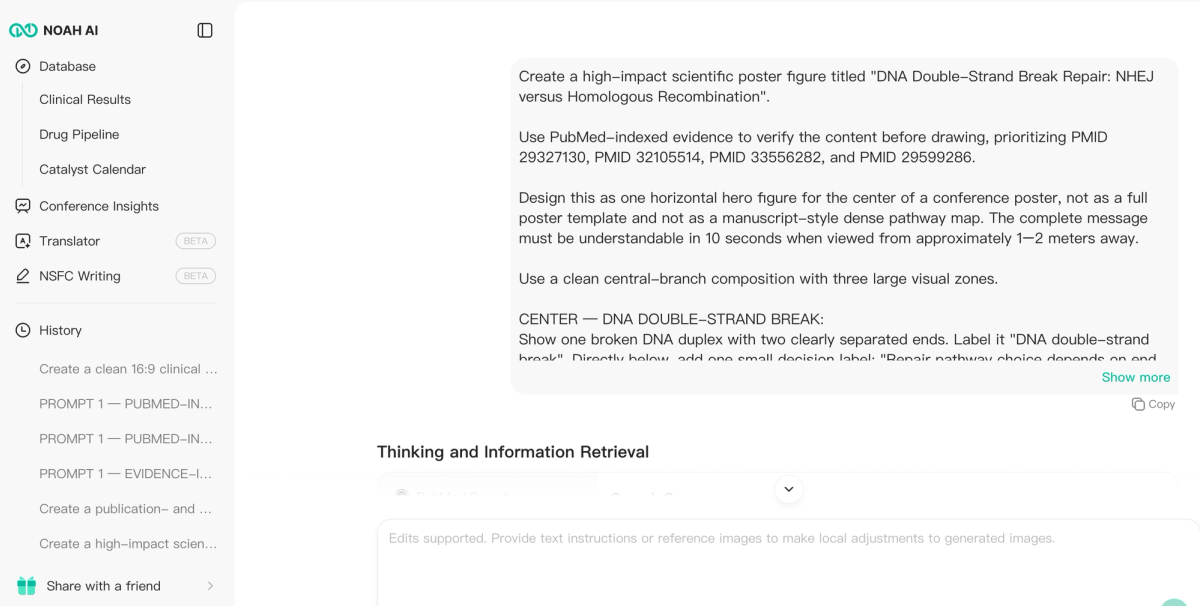
Figure 1. Noah retrieves the four specified PubMed records before generating the scientific poster figure.
What the first output accomplished
The first output created an immediately understandable branch structure. NHEJ appeared on the left with Ku70/80, DNA-PK, context-dependent end processing, XRCC4-LIG4, and direct end joining. Homologous recombination appeared on the right with end resection, RPA, RAD51, a sister-chromatid template, strand invasion, repair synthesis, and template-directed repair.
It also retained the three high-value poster comparisons: template requirement, cell-cycle association, and repair outcome.
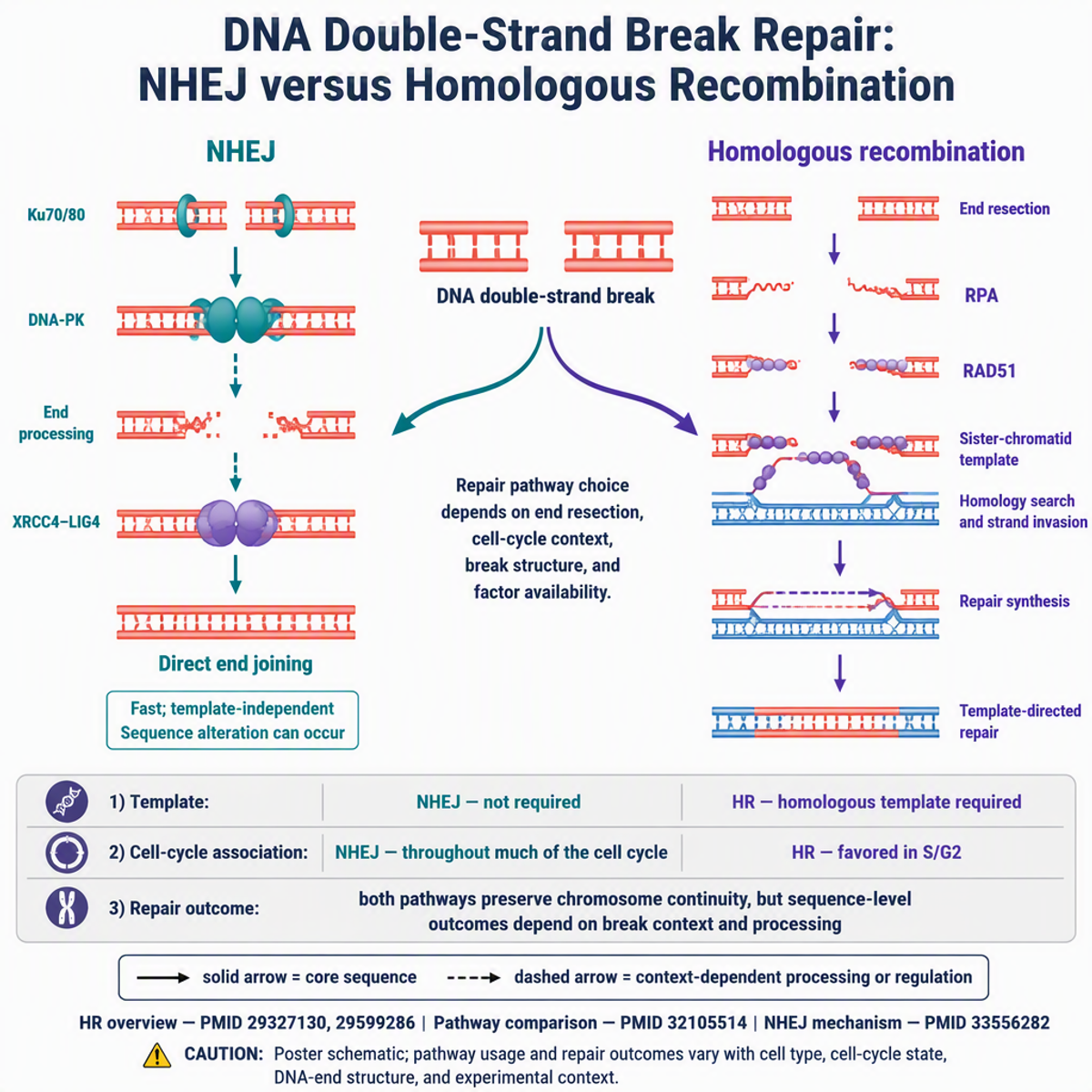
Figure 2. Noah's first output established the scientific comparison and visual hierarchy, but the downloaded file was 1024 × 1024 despite the request for a horizontal poster figure.
That dimension failure is important. A square figure can work in some poster grids, but it was not the requested horizontal hero figure. The initial version therefore proved scientific organization, not poster-format compliance.
Turning poster feedback into a revised output
We gave Noah a constrained review rather than asking it to "make the figure better." The revision instructions required:
- equal visual weight for the NHEJ and homologous-recombination branches;
- one DNA break and one pathway-choice label;
- larger poster-safe labels;
- removal of duplicated elements;
- a true horizontal 16:9 exported canvas;
- the same three-row comparison strip, legend, evidence footer, and caution;
- no new proteins, treatment claims, or clinical outcomes.
The final aspect-ratio revision produced a 1376 × 768 horizontal image. That is a meaningful improvement: the output now uses the width as a poster hero figure, separates the two repair branches, and reserves the lower band for rapid comparison.
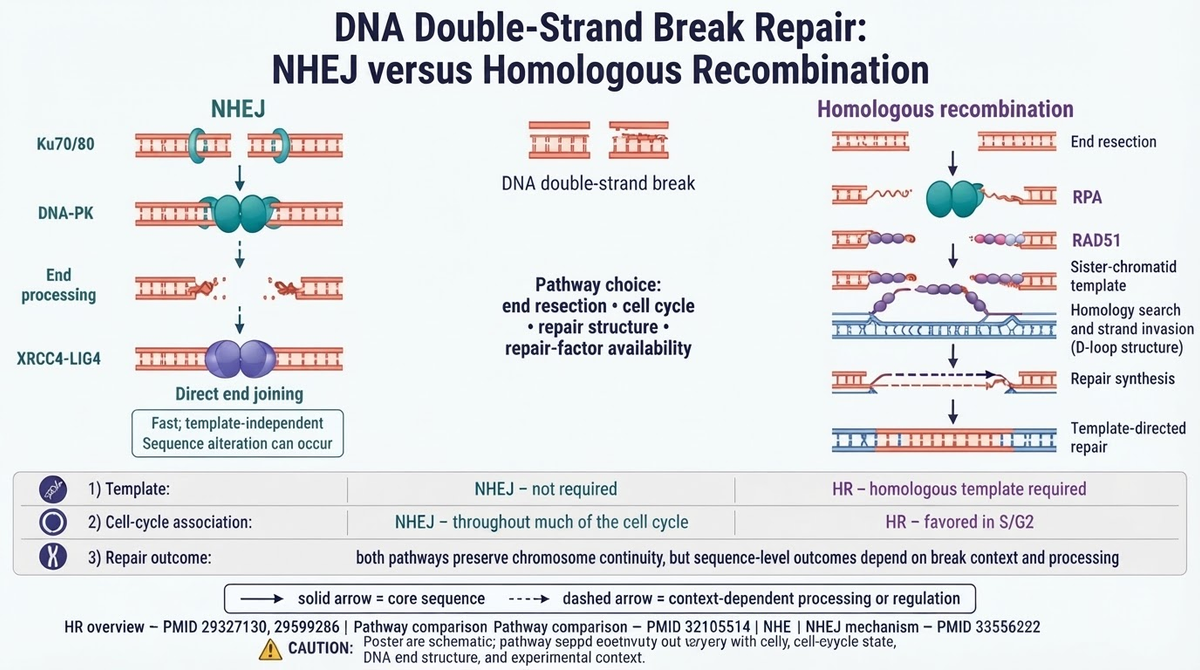
Figure 3. The final Noah revision converts the evidence-informed DNA-repair comparison into a genuinely horizontal poster figure. Exact footer copy still requires manual correction before printing.
The output was not prepress-perfect. The bottom evidence line repeated words, and an unwanted parenthetical label remained after a cleanup instruction. These are production errors rather than a reason to discard the whole workflow, but they define the correct boundary: Noah can generate and globally restructure a literature-informed figure; the accountable researcher must still proofread exact text and perform final vector or slide-level cleanup.
What the Noah case actually proves
The case supports three specific product advantages:
- Evidence and visual structure stay connected. Noah retrieved the prioritized PubMed papers inside the same task used to generate the figure.
- The prompt controls the communication job. The user could specify poster distance, reading time, label limits, branch symmetry, color roles, cautions, and prohibited claims—not just a list of objects.
- Natural-language review can change the global artifact. A follow-up instruction converted a square output into a wide poster figure without manually rebuilding both pathways.
It does not prove autonomous poster publication. Exact footer text, special characters, and final print production remain human responsibilities.
Choose Noah if: your bottleneck is translating scientific evidence into a central poster visual and you want a fast, reviewable candidate before final layout and prepress work.
2. Mind the Graph: best for manual scientific poster assembly
Mind the Graph remains a strong option when the main need is a scientist-oriented template and illustration library. Its official site advertises more than 75,000 scientific illustrations, hundreds of templates, poster formats, and an editor for changing colors, cropping, and adding text.
Its free plan is genuinely useful for testing and basic publishing, but the official site says free users must retain a watermark and cite Mind the Graph as the visual-content resource. Paid plans add broader libraries, watermark-free use, Creative Commons licensing, and higher-resolution exports.
Mind the Graph is therefore not something every user needs to replace. It is better than Noah when the scientific story is already approved and the researcher mainly wants to drag scientific assets into a full poster template.
Choose Mind the Graph if: you value a curated scientific asset library and hands-on poster construction more than prompt-to-evidence generation.
3. Canva: best for assembling the complete poster
Canva provides free and premium scientific and research-poster templates, with landscape and portrait layouts, collaboration, drag-and-drop elements, and familiar export tools. It is the stronger choice when the complete poster—title block, authors, charts, references, branding, QR code, and visual consistency—must be assembled in one environment.
Its limitation is scientific specificity. Canva can arrange a mechanism figure beautifully, but it does not independently establish whether the DNA-repair labels, pathway qualifiers, or citations are correct.
A practical hybrid workflow is to generate the central evidence-informed figure in Noah and assemble the full poster in Canva.
Choose Canva if: poster layout and team collaboration are the bottleneck, and scientific figures will be supplied as approved assets.
4. Adobe Express: best for fast free poster templates
Adobe Express advertises free research-poster templates, a no-credit-card entry point, general icons, fonts, stock assets, and fast template customization. It is useful when the poster needs strong visual polish without the complexity of Illustrator.
Like Canva, it is a general design environment rather than a biomedical evidence workflow. Researchers must provide approved scientific content and confirm licenses, labels, and references themselves.
Choose Adobe Express if: you want a fast, template-led poster design and do not need the design tool to retrieve or interpret scientific evidence.
5. Inkscape: best free option for exact vector finishing
Inkscape is a free, open-source vector editor for Windows, macOS, and Linux. It is the strongest no-cost option in this list for correcting exact text, adjusting paths, standardizing line weights, aligning panels, and exporting scalable artwork.
That precision comes with manual work. Inkscape does not retrieve PubMed records, create a biological story, or supply a curated life-science asset library. It is most valuable after the scientific structure is approved.
For the Noah test case, Inkscape would be an appropriate place to remove the remaining parenthetical label, correct the evidence footer, verify fonts, and prepare a final PDF or SVG for the poster-layout file.
Choose Inkscape if: zero-cost, exact final control matters more than automated evidence-to-figure generation.
Which free alternative should you choose?
- Choose Noah AI for a PubMed-informed scientific hero figure and natural-language restructuring.
- Choose Mind the Graph for curated scientific illustrations and manual poster templates.
- Choose Canva for the complete collaborative poster layout.
- Choose Adobe Express for quick free research-poster templates and general design polish.
- Choose Inkscape for exact free vector correction and print finishing.
The strongest workflow may combine tools: organize the evidence and central visual in Noah, review the science, correct exact text in Inkscape, and assemble the complete poster in Canva, Adobe Express, PowerPoint, or an institutional template.
Try Noah AI for Free
Use Noah AI to search, compare, and analyze biomedical evidence with AI-powered research workflows.
Free credits are available, and no credit card is required to get started.
Scientific poster figure checklist
Before generating
- Write the one sentence a viewer should remember.
- Separate the central figure from the full poster layout.
- List the exact evidence records and visible labels.
- Define the expected viewing distance and reading time.
- Specify the target aspect ratio and location in the poster grid.
- Prohibit unsupported clinical claims and universal mechanisms.
After every generated version
- Verify every protein, cell, arrow, compartment, and qualifier.
- Check whether the exported dimensions match the request.
- Inspect exact strings, PMIDs, punctuation, and special characters at 100% zoom.
- Reject duplicated labels and repeated icons.
- Confirm that dashed, solid, and inhibitory relationships remain distinct.
- Compare the new version with the best earlier version, not only with the prompt.
Before printing
- Correct final text in an editable environment when necessary.
- Check the conference's poster dimensions, file format, bleed, and color requirements.
- Export from the original asset rather than a screenshot.
- Print a letter-size proof and inspect it from different distances.
- Record image licenses, literature sources, and any AI-use disclosure required by the venue.
Frequently asked questions
Is there a genuinely free Mind the Graph alternative?
Yes, but "free" describes different things. Inkscape is free and open source but manual. Canva and Adobe Express provide free templates and elements. Noah advertises 20 free figure generations. Mind the Graph itself has a free plan, but its official site describes watermark and attribution requirements for free use. Always check current export and license terms.
Can Noah create an entire scientific poster?
Noah is better positioned here as the generator and revision environment for the central scientific figure. A complete poster still needs a layout tool for title blocks, authors, charts, references, branding, dimensions, and final print export.
What resolution should a poster figure use?
Use the conference's final print specifications. In general, download the original export, avoid enlarging browser screenshots, and prefer vector output when exact large-format scaling is required. Review all text at 100% zoom before placing the figure in the poster.
Why not simply make the figure in Canva or PowerPoint?
You can, especially when the mechanism and labels are already approved. Noah is more useful when the difficult step is turning literature and a complex scientific brief into the first coherent figure candidate.
Can an AI-generated poster figure be printed without review?
No. Researchers must verify scientific content, wording, citations, dimensions, licenses, and venue-specific AI-disclosure requirements. The Noah DNA-repair case demonstrates why: the global layout improved, while a footer-level text defect remained.
Final takeaway
The closest-looking Mind the Graph alternative is not automatically the best product for a scientific poster figure. The better question is which part of the work remains difficult: interpreting literature, constructing a central scientific story, assembling a complete poster, finding curated assets, or finishing exact vector artwork.
The Noah DNA-repair case demonstrates a meaningful product advantage. Noah can turn a PubMed-bounded mechanism comparison into a coherent poster figure, expose format and text problems for review, and respond to natural-language instructions that materially change the canvas. For researchers who otherwise move manually from papers to notes to a blank poster panel, that evidence-to-figure bridge is more valuable than another template gallery.
The case also establishes the correct production boundary: use Noah to accelerate evidence-informed visual synthesis and large structural revisions, then perform accountable scientific proofreading and final prepress cleanup in an exact editing environment.