Free BioRender Alternative for Reference-Image-Based Scientific Figures (2026)
Linda
Compare free BioRender alternatives for reference-image-based scientific figures, with a real Noah AI test from uploaded rough sketch to revised 16:9 output.
If you already have a rough sketch, an old slide, or a screenshot of a scientific mechanism, you do not need another blank-canvas drawing tool. You need a free BioRender alternative that can use a reference image as structural input and turn it into a clearer, researcher-reviewable figure.That distinction matters. Uploading an image for cropping is not the same as interpreting its scientific sequence. A useful reference-image workflow should preserve the relationships that carry meaning—order, compartments, arrows, labels, branches, and exclusions—while giving you a new visual draft that can be corrected before publication.For this specific job, Noah AI is the strongest free starting point in this comparison. Its scientific figure assistant accepts text prompts or reference images/files, and its current product page advertises 20 free generations. In the real test documented below, Noah converted a rough LNP–siRNA delivery sketch into a four-stage biomedical mechanism figure, explained how the new figure mapped to the source, and accepted a natural-language correction when the first output used the wrong aspect ratio.The alternatives remain useful, but for different stages: Mind the Graph for manual scientific asset assembly, Bioicons with draw.io for an open icon workflow, Inkscape for vector tracing and precise reconstruction, and Canva or Adobe Express for presentation-oriented image editing.
Quick answer: the best free options by task
| Product | Best use | How it uses a reference image | Free-use reality | Main limitation |
|---|---|---|---|---|
| Noah AI | Turning a scientific reference image into a new mechanism or workflow draft | Upload the image, describe what must be preserved, then revise the generated figure in natural language | Noah currently advertises 20 free generations | Generated biology, terminology, and layout still require expert review |
| Mind the Graph | Rebuilding a known figure with scientific templates and illustration assets | Import or view the source, then manually reconstruct the composition | Free plan is available, but official guidance requires a watermark and platform citation for formal use | More asset-first than reference-interpretation-first |
| Bioicons + draw.io | Open, low-cost manual reconstruction with scientific icons | Place the reference beside the canvas and rebuild with reusable SVG assets | Bioicons and draw.io can be used at zero cost; licenses vary by icon | Manual hierarchy, arrows, labels, and scientific checking |
| Inkscape | Vector tracing, cleanup, and precise redrawing | Import a bitmap, trace it, or reconstruct it with paths and shapes | Free and open source | Tracing copies contours; it does not understand biological meaning |
| Canva | Fast annotation and presentation-ready redesign | Upload an image, add text, shapes, icons, and a new layout | Many editing and export functions are free; some assets and AI tools are premium | General design tool, not a biomedical reasoning system |
| Adobe Express | Quick image cleanup, resizing, labels, and communication graphics | Upload an image and edit, resize, enhance, or annotate it | Adobe offers a free plan with core image-editing tools | Optimizes appearance rather than scientific structure |
What “reference-image-based” should mean
A reference image can be a hand sketch, a screenshot from a slide, a low-resolution draft, a whiteboard photo, or a figure you are authorized to adapt. The goal is not to copy every pixel. The goal is to transfer the scientifically meaningful structure into a new figure.For a mechanism or workflow, the final product should preserve at least:
- the correct sequence of events;
- the correct biological compartments and boundaries;
- labels that distinguish actors, states, and outcomes;
- arrows whose meaning is unambiguous;
- required branches, controls, or checkpoints;
- explicit exclusions, such as unsupported efficacy claims; and
- enough editability or iteration to repair mistakes.
This also creates a copyright boundary. A tool does not give you permission to reproduce a published figure. Use your own sketch, licensed assets, public-domain material, or a source you are authorized to adapt. When a published figure informs the scientific content, cite the underlying research and check the applicable reuse license.
How we evaluated the products
This comparison focuses on the unresolved part of the task, not on the number of icons in a library. We evaluated whether each product can help a researcher move from an existing visual reference to a usable new figure.The most important criteria were:
- Reference intake: Can the product accept or work alongside an existing image?
- Structural fidelity: Can it preserve order, compartments, relationships, and constraints?
- Scientific relevance: Does it provide life-science-specific reasoning or assets?
- Revision control: Can the user correct layout and scientific details without starting over?
- Free-use limits: Are watermark, attribution, export, or generation limits clearly disclosed?
- Reviewability: Does the output make it easy to identify what still needs scientific checking?
Noah AI — best free starting point for reference-guided scientific figure generation
Noah AI’s scientific figure assistant explicitly supports text prompts and reference images/files. Its public page currently promotes 20 free generations and positions the tool around biomedical figures, mechanism diagrams, clinical-trial designs, and technical overviews.Noah is most useful when the reference image contains scientific logic that must be interpreted before it is redesigned. Instead of merely placing the source on a canvas, the system can describe the uploaded structure, generate a new visual draft, explain the output, and accept follow-up instructions.
Real Noah case: redesigning a rough LNP–siRNA delivery sketch
To avoid copying a published figure, we created an original rough reference image showing a simplified hepatocyte-delivery sequence:
- LNP–siRNA in circulation with ApoE adsorption;
- LDLR-mediated hepatocyte uptake and endocytosis;
- endosomal escape into the cytosol; and
- RISC loading followed by target mRNA cleavage.
The scientific sequence was checked against PubMed-indexed literature. ApoE adsorption and LDLR-mediated hepatocyte delivery are supported in the LNP literature, while cytosolic siRNA loading into RISC and complementary target-mRNA cleavage are established elements of RNA interference. Endosomal escape remains a major delivery bottleneck, so the figure deliberately avoids pretending that the underlying mechanism is fully resolved.
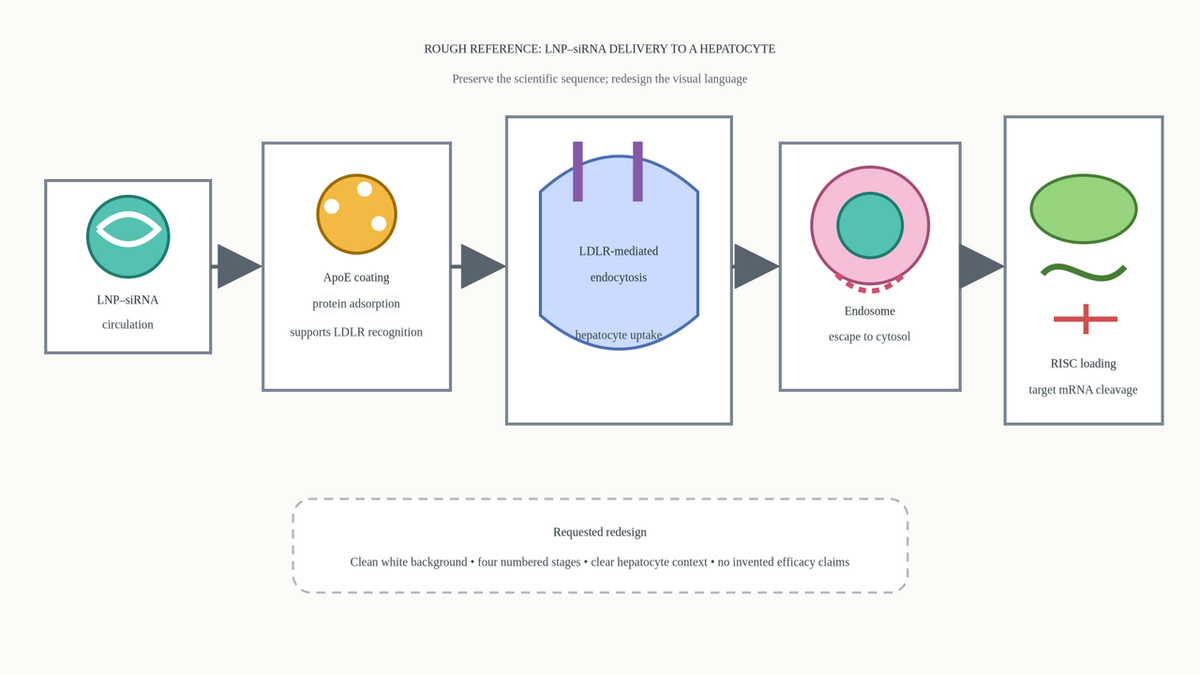
Figure 1. Original reference image created for this test. It defines the scientific sequence without borrowing another publisher’s visual design.
We uploaded the image and used this prompt:Use the uploaded reference image as the structural source. Redesign it into a clean 16:9 scientific mechanism figure showing LNP-mediated siRNA delivery to a hepatocyte. Preserve the left-to-right sequence and labels: 1) circulation and ApoE adsorption; 2) LDLR-mediated hepatocyte uptake and endocytosis; 3) endosomal escape; 4) cytosolic RISC loading and target mRNA cleavage. Show hepatocyte membrane and cytosol context, but do not add efficacy claims, clinical outcomes, doses, or unsupported molecular steps. Use restrained scientific icons, a white background, concise labels, high contrast, and clear numbered stages. Treat the uploaded image as a reference to reorganize and polish, not something to copy pixel for pixel.
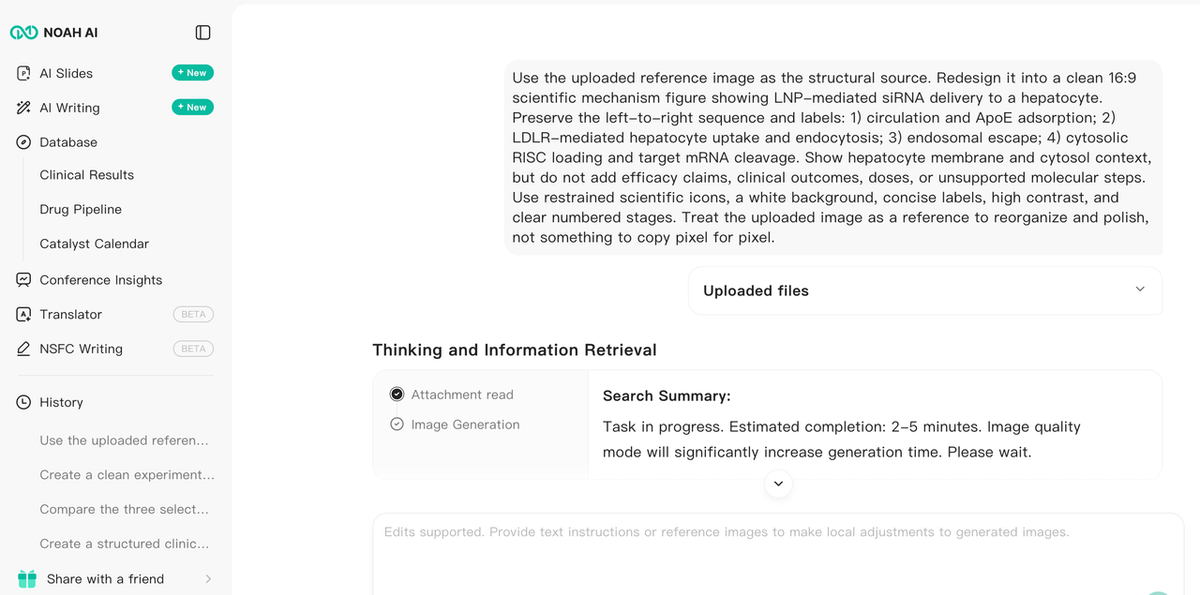
Figure 2. Real Noah interface showing the uploaded file, exact prompt, attachment read status, and explanation of how the generated figure preserved the four-stage reference structure.
The final output
The regenerated image used a 1376 × 768 canvas, close to 16:9. It preserved the same semantic chain from the rough reference while replacing the simple boxes with a more coherent biomedical mechanism illustration.
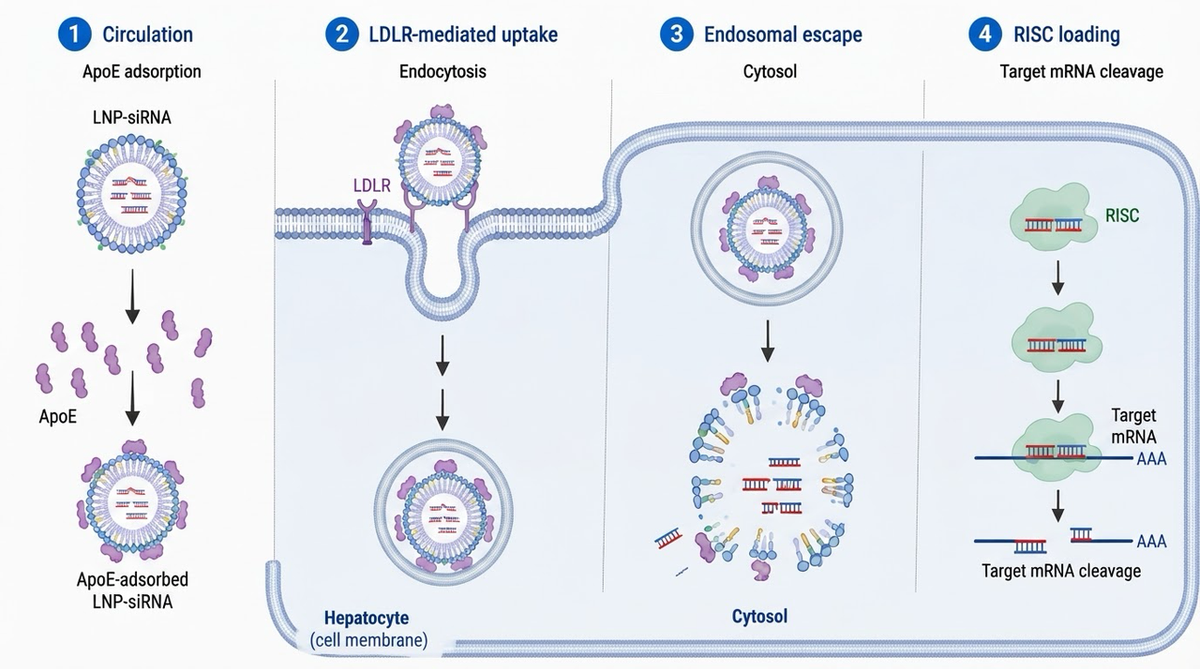
Figure 3. Final exported Noah figure: ApoE adsorption, LDLR-mediated uptake, endosomal escape, and RISC-mediated target-mRNA cleavage.
What this Noah case actually proves
The case proves three product advantages that are directly relevant to the search query.First, Noah accepted a reference image as scientific input, not merely as decoration. Its explanation mapped the generated stages back to the uploaded structure.Second, the output was a newly organized figure, not a traced copy. The new image preserved the left-to-right mechanism while changing the visual language, cellular context, and composition.Third, Noah supported constraint-based iteration. The first draft violated the requested aspect ratio; the second instruction corrected the layout without requiring the user to rebuild the figure manually.The case does not prove that Noah can replace scientific review. The final figure still needs checking for representation of ApoE association, the simplified depiction of endosomal escape, the guide/passenger-strand logic implied by RISC loading, label hierarchy, and the target journal’s AI-figure policy. Treat the output as a researcher-reviewable draft.
Mind the Graph — best for manually rebuilding with scientific assets
Mind the Graph is a strong alternative when you already understand the reference figure and need scientifically recognizable illustration assets. Its official site emphasizes scientific figures, graphical abstracts, templates, and an illustration library.For a reference-image task, the practical workflow is manual: keep the original visible, identify the scientific objects, choose corresponding assets, and reconstruct the composition. This provides more direct canvas control than generative redesign, but the user remains responsible for deciding which relationships matter.The free plan has an important publishing caveat. Mind the Graph states that free use retains its watermark and requires citation of the platform for formal communication. Paid plans expand high-resolution export and watermark-free use. Check the current license and export terms before publishing.Choose Mind the Graph when the scientific story is settled and the main bottleneck is finding suitable biomedical illustrations—not interpreting what the reference figure means.
Bioicons with draw.io — best open, low-cost manual workflow
Bioicons provides thousands of scientific illustrations in reusable formats, while its draw.io extension workflow offers a zero-cost way to assemble them into diagrams. Bioicons describes draw.io as a free online drawing service that can save locally, support collaborative editing, and export multiple formats.This combination works well when privacy, local control, reusable SVG assets, or budget matters more than automation. Place the reference image beside the canvas, recreate the structure with Bioicons, and use draw.io for labels, arrows, groups, and alignment.The limitation is semantic labor. Bioicons supplies assets; it does not decide whether a membrane boundary, treatment arm, or causal arrow is scientifically justified. Licenses also vary by icon, so attribution must be checked asset by asset.
Inkscape — best for free vector tracing and precise reconstruction
Inkscape is a free, open-source vector editor. Its Trace Bitmap workflow can convert a raster image into vector paths, and its drawing tools provide fine control over typography, spacing, curves, arrows, and export.Inkscape is the best option in this list when you need exact manual production control and are comfortable rebuilding the figure yourself. It is especially useful for cleaning a low-resolution line drawing, recovering simple shapes, or preparing a final SVG or PDF.But tracing is not interpretation. The official Inkscape tracing guidance warns that vectorization produces curves rather than a finished or necessarily accurate copy. A traced arrow remains scientifically wrong if the source arrow was wrong. Use Inkscape after the biology and layout have been reviewed.
Canva — best for fast presentation-oriented redesign
Canva supports uploading your own images, adding text and graphic elements, collaborating, and exporting finished designs. Its scientific poster templates and general design library make it useful for slide-ready or educational figures.Choose Canva when the reference image is already scientifically correct and the task is primarily communication: clearer labels, brand colors, presentation hierarchy, or a simplified diagram for a broad audience.Canva is not a biomedical interpretation tool. It will not determine whether a receptor is in the correct membrane, whether an arrow means transport or causality, or whether a mechanism claim is supported. Some assets and AI features also require paid access.
Adobe Express — best for quick image editing and annotation
Adobe Express provides a free plan with core image-editing tools. Its official editor supports uploading common image formats, adding text, resizing, applying adjustments, and downloading the result.It is useful when the reference figure needs cleanup rather than scientific reconstruction: cropping empty space, improving contrast, adding labels, changing the aspect ratio, or preparing a communication graphic.Adobe Express should not be confused with a scientific reasoning system. It can improve the appearance of an image, but the user must supply and validate the biomedical content.
Which free BioRender alternative should you choose?
Start with the part of the task you cannot yet solve:
- Choose Noah AI when the reference image contains scientific structure that must be interpreted, reorganized, or revised through prompts.
- Choose Mind the Graph when the structure is settled and you want a science-specific asset library and templates.
- Choose Bioicons with draw.io when you want an open, low-cost, manually editable scientific diagram workflow.
- Choose Inkscape when you need vector tracing or precise final reconstruction.
- Choose Canva when the figure is for slides, education, or general communication.
- Choose Adobe Express when the main task is image cleanup, resizing, or annotation.
A realistic workflow may use more than one product: generate a reference-guided draft in Noah, perform expert scientific review, then finish the accepted concept in Inkscape, draw.io, or another vector editor.
Reference-image checklist before publication
Before publishing any adapted or AI-generated scientific figure, verify:
- you have the right to use or adapt the reference image;
- the new figure is sufficiently original and correctly attributed where required;
- biological compartments, structures, and scales are not misleading;
- every arrow has an explicit and correct meaning;
- mandatory and optional steps remain distinguishable;
- labels use field-appropriate terminology;
- the figure does not add unsupported efficacy, safety, dose, or outcome claims;
- the exported resolution and aspect ratio match the destination;
- the source-to-figure reasoning is documented; and
- the journal, conference, or institution permits the relevant use of generative AI.
FAQ
Can I upload a screenshot to create a scientific figure with Noah?
Yes. Noah’s official scientific figure page states that users can provide reference images or files. In the documented test, Noah accepted a PNG rough sketch, described its four-stage structure, generated a new mechanism image, and retained the source attachment in the result record.
Is Noah a free BioRender alternative?
Noah currently advertises 20 free generations on its scientific figure page. That makes it a practical free starting point, but generation allowances and product terms can change. Verify the current plan before committing a larger project.
What is the best free tool for manually redrawing a scientific reference image?
Bioicons with draw.io is a strong zero-cost combination for manual scientific diagram assembly. Inkscape is stronger when you need tracing and precise vector control. Neither automatically interprets the underlying biology.
Can I copy a figure from a paper by uploading it to an AI tool?
Not automatically. Tool access does not grant copyright permission. Use an image you own, a properly licensed figure, or an original sketch based on facts from cited research. Check the reuse license and the target publisher’s rules.
Can an AI-generated scientific figure go directly into a manuscript?
Do not assume so. Review scientific accuracy, provenance, licensing, disclosure, authorship, and journal policy. A reference-guided AI output should normally be treated as a draft until the complete publication workflow has approved it.
Final takeaway
The best free BioRender alternative depends on what the reference image is supposed to contribute. If it is merely a background to annotate, Canva or Adobe Express may be enough. If it is a visual specification to rebuild manually, Bioicons, draw.io, Mind the Graph, or Inkscape provide more direct control.If the reference image contains scientific logic that must be understood and reorganized, Noah is the most differentiated option in this comparison. The LNP–siRNA case shows why: Noah accepted an original rough sketch, preserved the four-stage mechanism, explained the transformation, and corrected a concrete layout failure through a follow-up instruction.
Turn your authorized reference image into a researcher-reviewable scientific figure with Noah AI.